
Vitál: A Wellness OS for People Who Live at Their Laptops


But that is exactly the problem. The people who most need consistent wellness support — people managing health conditions, people under sustained work pressure, people trying to build better habits while life gets in the way — are the same people least likely to proactively open an app and track themselves.
Vitál is built from a different assumption: the wellness tool should come to you.
The Problem
If you spend most of your working day at a computer, your laptop is already the most consistent thing in your life. It knows when you wake up. It knows when you stop. It is always on, always nearby, always running, and yet it does nothing for your health.
Existing wellness tracker like Fitbit and Whoop solve this by sitting on your wrist. It’s a device that travels with you, monitors you passively, and speaks up when something needs attention. That works extremely well but it requires buying hardware, syncing accounts, and trusting a cloud service with biometric data.
Most people do not have a Whoop device but they have a laptop or a desktop and they sit in front of it most of the time.
Vitál is the software equivalent of a wearable — a background system that runs on the machine you already own, watches over your workday, and keeps you accountable to the habits that matter.
What Vitál does
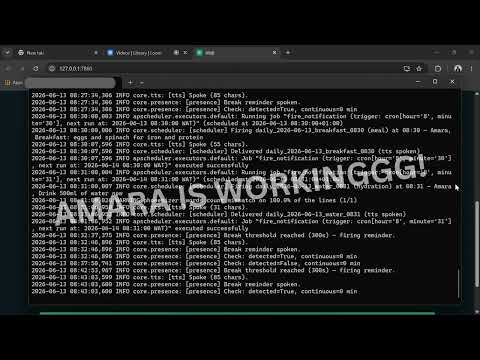
Vitál is an ambient, local-first personal wellness companion that runs on your computer. It is a background system that knows the user. It interviews you once, builds a personal plan in the local DB, schedules hydration and movement reminders, speaks optional voice nudges, and coaches you with a small LLM that can read and write your logs.
It is designed for anyone who spends long hours at a computer and wants to live more intentionally — eating better, moving more, taking medication consistently, and managing their energy. It is especially valuable for people managing health conditions.
What makes it different:
- All user data (profile, logs, conversations) is stored locally in SQLite. Nothing is persisted off-device.
- The system is fully dynamic: onboarding interviews the user, the LLM designs their personal plan, and all daily behavior is driven by what was saved to the local database.
- It speaks out loud to the user via local TTS.
- It watches for desk presence via webcam and responds accordingly.
How it Works
At first launch, it interviews you. It asks about your health goals, your daily routine, your medications or supplements if any, your local foods, your sleep schedule, what you want to improve. From your answers, the LLM builds a complete personal wellness plan: a notification schedule, a daily check-in structure, a nutrition framework, and an exercise plan — all tailored to you specifically.
You review the plan, adjust anything you want, approve it and it gets saved to a local SQLite database on your machine. From that point, Vitál runs on what it built for you.
Every day it:
- Greets you by name with a spoken morning briefing — what the day looks like, what to prioritize, how yesterday went
- Runs your personalized notification schedule: hydration nudges, medication reminders, meal prompts, movement breaks — at the times it decided made sense for your routine
- Detects when you have been sitting at your desk too long and tells you, out loud, to take a break
- Checks local weather and adjusts outdoor activity reminders accordingly
- Lets you log food in plain language and reasons about it in the context of your goals
- Lets you ask your wellness coach anything, in natural conversation, at any time
Every Sunday it:
- Generates a narrative weekly report in plain English — patterns spotted, wins noted, things to watch
- Designs next week's plan based on how this week actually went
The checklist, the metrics, the daily log fields, all of it is generated from your profile at onboarding and stored in the database. The codebase contains no hardcoded health logic, no conditional for any specific condition or goal. Everything behavioral comes from what the LLM decided, saved as data, and executed by the app as a runtime engine.
The Architecture

The LLM as an Architect
The most important design decision was making the LLM responsible for designing each user's daily life.
At onboarding, a structured LLM call returns a JSON object containing the user's daily log schema, their full notification schedule with times and messages, their nutrition framework, their exercise plan, and their weekly review structure. APScheduler reads these job definitions from the database on every startup and registers the jobs. The Gradio UI renders check-in fields dynamically from the stored schema.
This means the same codebase produces a completely different app for every user, because the LLM shapes it.
Privacy as a design constraint
All user data — profile, logs, conversations, plans — lives in data/vital.db on the user's machine. It never leaves. The LLM receives only the text context for each call: a profile summary, today's logs, the current time and weather. No raw database contents, no identifying information beyond what is needed to generate a response.
This is a deliberate architectural choice, it’s what makes the product trustworthy for anyone who wants to be honest about their health without that information sitting on a server somewhere.
The Model: Nemotron 3 Nano 4B on Modal
The LLM is NVIDIA Nemotron 3 Nano 4B BF16, served via vLLM on Modal behind an OpenAI-compatible endpoint. A 4 billion parameters well within the Build-small-hackathon's ≤32B model constraint, while delivering reliable instruction-following and structured JSON outputs which every pipeline in the app depends on.
The bet is on the structure of the model response: separate JSON schemas per pipeline, Python validation on every output, retry logic, and template fallbacks if generation fails. The model is pushed hard and held accountable, rather than trusted to freewheel.
Modal runs the inference on an A10G GPU with scaledown_window=15min — so there is no 24/7 GPU bill for a personal wellness app. The app calls Modal only when it needs to reason. Everything else runs locally.
The choice for hosting the model on modal through a vLLM inference server is because most people device will struggle to run the model locally, and the aim of this tool is to run on the background of the users machine without disrupting their activities on it.
A later version will include an optimized model that can run comfortable on-device.
Tool calling for database interaction
The daily startup run and Coach tab uses LLM tool calling for all database read/write operations. When a user logs a meal by typing it in chat, the model issues a log_food tool call. When they ask "how am I doing on water today?", it calls get_todays_logs. The local Python code executes the tool against SQLite and returns the result. The model then generates the final human-readable response.
The LLM is a reasoning and orchestration layer that never touches the database directly.
Tools include: get_todays_logs, get_todays_schedule, get_medications_today, log_food, log_water, log_exercise, get_weekly_summary, write_weekly_report, and more.
Presence Detection
OpenCV checks for face presence once every five minute using a Haar cascade classifier. It grabs one frame, runs detection in ~100ms, and releases the camera immediately. When the continuous-sitting timer crosses the configured threshold, a desktop notification fires and Kokoro TTS speaks the break reminder out loud.
If no camera is detected, presence detection silently disables itself.
Local Hardware Stack
In full local mode:
- Kokoro TTS — natural voice for spoken reminders and morning greeting
- plyer — cross-platform desktop push notifications
- OpenCV — webcam desk-break detection
- APScheduler — background job runner, loading jobs from the database on every startup
- wttr.in — weather fetch, used to contextualize outdoor activity nudges
The Gradio UI
Vitál uses gr.Blocks with a custom theme and CSS overrides. Five tabs, each corresponding to a layer of the wellness day:
Home — morning briefing, daily checklist, metric cards, dynamically rendered check-in form.
Nutrition — nutrient progress for the day, logged meals with LLM commentary, weekly priority foods.
Movement — today's exercise plan, log buttons, safety notes relevant to the user's profile, streak.
Coach — quick-question chips personalized to the user's profile, full chat with tool calling and streaming responses.
Report — weekly narrative, daily metric chart, adherence stats, next week's plan preview.
Onboarding lives in a separate tab that is hidden from navigation after completion. The app detects on startup whether onboarding has been completed and routes accordingly.

Full Local vs Space Demo
The HuggingFace Space runs in DEMO_MODE=true with a pre-seeded SQLite profile to explore the full interface without onboarding. TTS, webcam presence, and desktop notifications are disabled, those require local hardware.
The local app is the full experience: one command starts everything, the browser opens automatically, and Vitál speaks its morning greeting before you have had coffee.
On Windows: install.bat then Start_Vital.bat.
On any platform: uv sync && uv run python app.py.
What comes next
Vitál was built in under seven days. The architecture was designed to grow:
- Fully local inference — swap Modal for a local inferencing of an optimized LLM
- Wearable sync — Bluetooth LE for passive heart rate and step data
- Federated learning — aggregate anonymized patterns across users to improve recommendations without centralizing data
- Multi-language support — localized interfaces for users whose first language is not English
- Mobile companion — push notifications when away from the laptop
Try it
Live demo: build-small-hackathon/Vital
Source code: github.com/EddyEjembi/Vital
Demo video: Vital Demo Video
Built with: Gradio 6 · SQLite · APScheduler · Modal · vLLM · NVIDIA Nemotron 3 Nano 4B · Kokoro TTS · OpenCV · plyer
Built by Eddy Ejembi for the Build Small Hackathon (HuggingFace × Gradio), June 2026.
